Orchestrating Subagents at Scale with Dynamic Workflows by Invoking ultracode
Dynamic workflows that write orchestration scripts on the fly and direct hundreds of subagents in parallel have been released as a Claude Code research preview. Based on the official announcement and documentation, we cover how they differ from subagents and skills, the ultracode trigger and /effort ultracode, the /workflows progress view, sizing guidelines, and how to control costs with agent caps.
In the loop engineering guide we touched on dynamic workflows while covering proactive loops. This article takes dynamic workflows on their own. Released by Anthropic as a research preview in late May 2026, a dynamic workflow has Claude write an orchestration script on the fly, and that script directs tens to hundreds of subagents in parallel.1 The announcement post on X passed four million views, and dynamic workflows are settling in as the answer to 'work one agent loop can't handle'.
What is a dynamic workflow
A dynamic workflow is a JavaScript script that orchestrates subagents at scale. You describe the task, Claude writes a script for it, and a separate runtime executes it in the background. Because the script keeps running in the background, you can carry on with other work in the session.2
The core design decision is that intermediate results live in 'script variables', not in Claude's context window. Run a multi-step task through subagents or skills and every step's result piles into context. In a dynamic workflow, the script holds the loops, branches, and intermediate results, so only the final answer reaches Claude's context. The structure where the context limit was the task-size limit comes undone.
How it differs from what came before
Claude Code already had ways to run multi-step work: subagents, skills, and agent teams. The official docs explain the difference as 'who holds the plan'.2
Subagents · Skills | Agent teams | Dynamic workflows | |
|---|---|---|---|
Who decides what runs next | Claude, turn by turn | The lead agent, turn by turn | The script |
Where intermediate results live | The context window | A shared task list | Script variables |
Scale | A few delegated tasks per turn | A handful of long-running peers | Tens to hundreds of agents per run |
What's reusable | The worker definition and instructions | The team composition | The orchestration itself |
Moving the plan into code does more than increase scale. It lets you pin quality patterns down so they repeat. You can have independent agents adversarially verify each other's findings before anything is reported, or draft a plan from several angles and weigh the drafts against each other, deterministically. That is why trustworthy results come out.
Getting a feel for dynamic workflows with /deep-research
The fastest way to see how a dynamic workflow actually runs is to try the built-in /deep-research workflow. Claude Code ships with the /deep-research workflow, which investigates a single question across multiple sources. You let the agents do the deep research in the background while you keep working on whatever you want in your session. The deep research results do not pile up in the session turns; what you receive is a single final report.2
Step 1, run it: Attach the question you want investigated to /deep-research and run it. The dynamic workflow runs and searches from multiple angles, preparing a well-cited report with cross-verified sources.
/deep-research What changed in the Node.js permission model between v20 and v22?Step 2, approve: Claude Code asks whether to allow the workflow. Selecting Yes starts execution. The exact look of the prompt varies slightly depending on the permission mode.
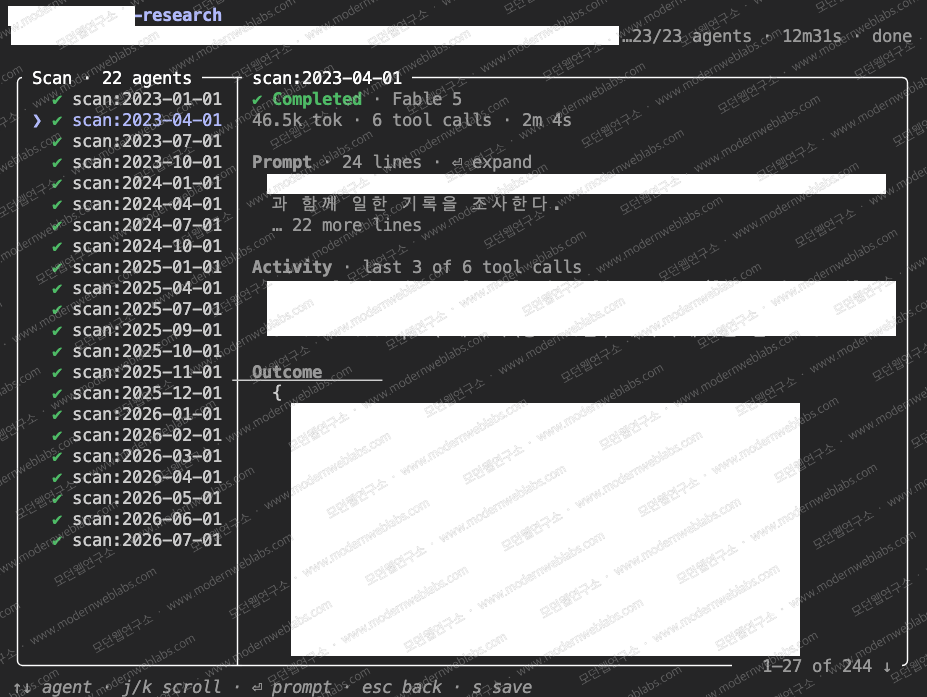
Step 3, check progress: Execution runs in the background. If you type /workflows at the prompt, you can use the arrow keys to pick a run and press Enter to open a view that shows progress. Each step shows the number of agents, the token total, and elapsed time, and drilling into a step lets you see what each agent found. A one-line summary also appears in the task panel below the input box, and you can expand the workflow with the down arrow and Enter.
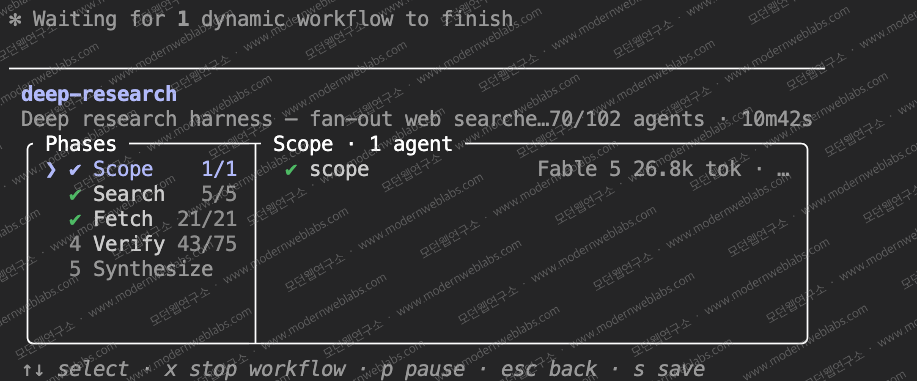
Step 4, read the report: When the deep investigation finishes, the report arrives in the session automatically. Every claim is cited, and claims that failed cross-verification have already been filtered out. Starting with Claude Code v2.1.196, claims that a verifier agent could not check due to rate limits or API errors are not treated as refuted but are labeled as "unverified."
Once you have a feel for it, it is time to build a workflow tailored to your own work. You can have Claude write a workflow using the three methods below.
Three ways to start a dynamic workflow
There are three ways to start one.2
Ask in natural language: say it directly, like "use a workflow", and Claude writes the script
Put the
ultracodekeyword in your prompt: for running just this one task as a workflow without changing session settingsSwitch the whole session with
/effort ultracode: raises reasoning effort to xhigh automatically, and Claude plans a workflow for every substantial task on its own. A task that needs understanding first can automatically become three consecutive workflows: map the code → make the change → verify it
The ultracode keyword has a backstory. When the preview launched, the trigger word for dynamic workflows was workflow, and feedback poured in from people who merely used the word in conversation and set off a large run. Anthropic changed the explicit trigger to ultracode within a week of launch (v2.1.160).3 If a dynamic workflow fires by accident, dismiss it with Option+W on macOS or Alt+W on Windows and Linux.
ultracode: audit every API endpoint under src/routes/ for missing auth checks Before running, a dynamic workflow asks for approval and shows you the plan. The options are run it now (Yes, run it), don't ask again for this workflow in this project (Yes, and don't ask again), read the script first (View raw script), and cancel (No). Regardless of which permission mode the session is in, the subagents a workflow spawns always run in acceptEdits mode and inherit the session's tool allowlist. So when a long run is coming, add the commands the agents will need to your allowlist beforehand, so the run doesn't stall waiting for approvals.
How to watch a run
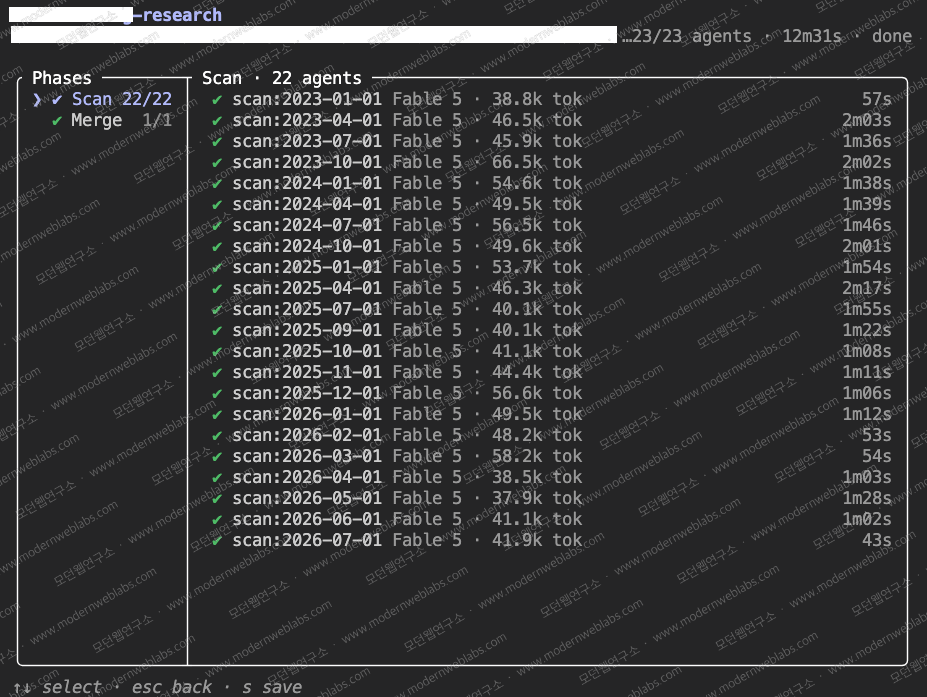
Runs execute in the background, and the /workflows command opens a view where you can track progress. Inside the view you see the agent count, total tokens, and elapsed time for each stage. Drill into a stage and you can read each agent's prompt and result. Specific key bindings are collected in the "Keyboard controls" table below.2
Checking a completed run with the
/workflowscommand
Inspecting one agent's work out of 23 total agents
Claude Code also warns you when a run is larger than expected. If a run is about to exceed 25 agents or if the projected total tokens go over 1.5 million, a "Large workflow" warning appears on the progress line below the input box (v2.1.203). The warning is advisory only and does not stop execution, so if you want to halt the run you have to enter /workflows and stop it yourself. Results from agents that have already finished are preserved, so you can stop without losing work.
Newsletter
Notes vetted by enterprise practitioners, every two weeks.
Notes on Claude Code, GitHub Copilot, AI-native engineering strategy, and adoption case studies, curated every two weeks.
Keyboard controls
The /workflows progress view lists the key for each action in its footer. Here is the full set from the official docs.2
Key | Action |
|---|---|
| Select a phase or agent |
| Drill into the selected phase, then into an agent to read its prompt, recent tool calls, and result |
| Back out one level |
| Scroll within the agent detail when it overflows |
| Filter the agent list in the selected phase by status; press again to cycle (from v2.1.186) |
| Pause or resume the run |
| Stop the selected agent, or stop the whole workflow when focus is on the run |
| Restart the selected running agent |
| Save the run's script as a command |
Keys on the other screens, gathered here too.2
Screen | Key | Action |
|---|---|---|
Task panel (below the input box) |
| Focus the progress line, then expand it |
Pre-run approval |
| Open the script in your editor |
Pre-run approval |
| Adjust the prompt before the run starts |
Save dialog (via |
| Toggle the save location (project / home) |
Save dialog |
| Save |
Input box |
| Dismiss an accidental |
Input box |
| Press right after the highlighted keyword to dismiss it |
What the script Claude writes looks like
Every dynamic workflow run leaves its script as a file in the session directory. You can open it to read what Claude wrote, compare it against a previous run, fix what needs improving, and run the workflow again. A small audit workflow sample looks like this.2
export const meta = { name: 'audit-routes', description: 'Audit every route handler for missing auth checks', } // Step 1: build the list of files to audit const found = await agent('List every .ts file under src/routes/.', { schema: { type: 'object', required: ['files'], properties: { files: { type: 'array', items: { type: 'string' } } } }, }) // Step 2: audit each file with its own agent, in parallel const audits = await pipeline(found.files, file => agent(`Audit ${file} for missing authentication checks.`, { label: file }), ) return audits.filter(Boolean) The body is plain JavaScript with top-level await. The agent() function spawns one subagent (step 1), and the pipeline() function runs one agent per file in the list (step 2). Pass the schema option and agents return structured data, so no result-parsing code is needed. You'll rarely write a script yourself, but being able to read what Claude generated makes the pre-run approval decision much faster.
Where it fits
The representative shapes in the official docs are 'repeat the same step across many items' and 'repeat until convergence'.2
Large-scale audits: assign one agent per file, adversarially verify the findings, then report
Convergence loops: run
npx tsc --noEmitand keep fixing errors until the type check passesParallel migrations: transform hundreds of components in isolated copies and verify each result
Cross-checked research: the bundled
/deep-researchis this shape. Search the web from multiple angles, cross-check sources, and produce a cited report
A case showing the upper bound already exists. Jarred Sumner, the developer of Bun, used dynamic workflows to port Bun from Zig to Rust. A job on the scale of 750,000 lines of Rust took eleven days from first commit to merge, with 99.8% of the existing tests passing.4
Controlling the cost
One workflow can use far more tokens than a normal session, and the usage counts against your plan limits as-is. The controls the official docs and the Claude team's announcement both recommend are these.2
Pilot on a small slice (the tracer-bullet strategy): gauge usage on one directory instead of the whole repo, a narrow question instead of a broad one.
Set a size guideline: pick small (under 5 agents), medium (under 15), or large (under 50) in Dynamic workflow size under
/config, and Claude writes scripts that respect the limit.Trust the runtime caps, but check: 16 concurrent agents and 1,000 agents total per run cap the cost even when a script runs away. Watch per-agent tokens in real time in the
/workflowsview.Split models by stage: every agent uses the session's model by default. State in the task description that mechanical stages should run on a smaller model and the cost drops.
On availability: dynamic workflows work on all paid plans (Pro, Max, Team, Enterprise) and with the Claude API, Amazon Bedrock, Google Cloud, and Microsoft Foundry, and require Claude Code v2.1.154 or later. On Pro, turn on the Dynamic workflows row in /config yourself.2
Save the good runs and share them with the team
When a run does what you wanted, save its script as a command with the s key in /workflows. Where you save it is who gets it.
Save to the project's
.claude/workflows/and everyone who clones the repository runs the saved dynamic workflow as/name.Save to
~/.claude/workflows/in your home directory and the workflow is yours alone.
Saved workflows accept input through args. Build a custom dynamic workflow called /triage-issues, invoke it like "run /triage-issues on issues 1024, 1025, and 1030", and the script receives the issue list as structured data and starts iterating immediately. This is how you apply the same review procedure to every branch as a script, and put the same repeatable process in the hands of every teammate, agents included.2
Wrapping up
Seen through the loop engineering lens, dynamic workflows are the execution engine of the proactive loop. If the loop guide was the frame for deciding what to hand off, workflows are the means of processing what you handed off at a scale beyond the context limit. What doesn't change is that scale is cost. The order Modern Web Labs recommends matches the announcement: pilot on a narrowly cut task (the tracer-bullet strategy) to measure real token usage, put the size guideline and allowlist in place, and only then hand over the real job. Always save the runs that worked, so next time you reuse an orchestration that's already proven.
Claude Developers (@ClaudeDevs), New in Claude Code (research preview): dynamic workflows, X, 2026-05-29.
↩Anthropic, Orchestrate subagents at scale with dynamic workflows, Claude Code Docs.
↩Claude Developers (@ClaudeDevs) announced the trigger change in a tweet on 2026-06-04. The version reference follows the official docs: "Before v2.1.160 the literal trigger keyword was workflow".
↩Anthropic, Introducing dynamic workflows in Claude Code, Anthropic Blog.
↩
Originally published at Modern Web Labs (www.modernweblabs.com). © Modern Web Labs. All rights reserved.
Newsletter
Notes vetted by enterprise practitioners, every two weeks.
Notes on Claude Code, GitHub Copilot, AI-native engineering strategy, and adoption case studies, curated every two weeks.
Modern Web Labs · Consulting
You read it. Now bring it into your team.
If the patterns in this post fit your situation, start with a short conversation about how to apply them.
How we can help
Claude Code · GitHub Copilot
Two-day hands-on plus AI-graded in-house certification
AI-Native Strategy
Redesign operating standards, measurement, and governance
Web Platform
Building full-stack services on Next.js