After Prompts and Harnesses Comes Loop Design: The Claude Code Team's Loop Engineering Guide (/goal · /loop · /schedule)
Instead of prompting your coding agent, design loops. The Claude Code team's official guide defines four loop types (turn-based, goal-based, time-based, proactive), when to use each, and how to keep code quality up while managing token usage. This is Modern Web Labs' restructured edition of the guide.
In the coding-agent community these days, the conversation has shifted from writing better prompts to 'designing loops'. The starting point of the discussion was a post on X by Peter Steinberger, creator of OpenClaw: stop prompting coding agents and start designing the loops that prompt them.1 Search X for what a loop actually is, though, and every person gives a different answer. To settle the confusion, the Claude Code team published an official guide on July 7, 2026.2 It defines four loop types, explains when to use each, and covers how to maintain code quality and manage token usage. This article is Modern Web Labs' restructured edition of that guide.
What is a loop
The Claude Code team defines loops as "agents repeating cycles of work until a stop condition is met". The guide then categorizes loop types along four criteria.
What triggers the loop
What stops the loop
Which Claude Code primitive it uses
What type of task fits it best
One premise before we start. Not every task needs a complex loop. Try the simplest approach first, and reach for the patterns below selectively when it falls short.
Turn-based loops
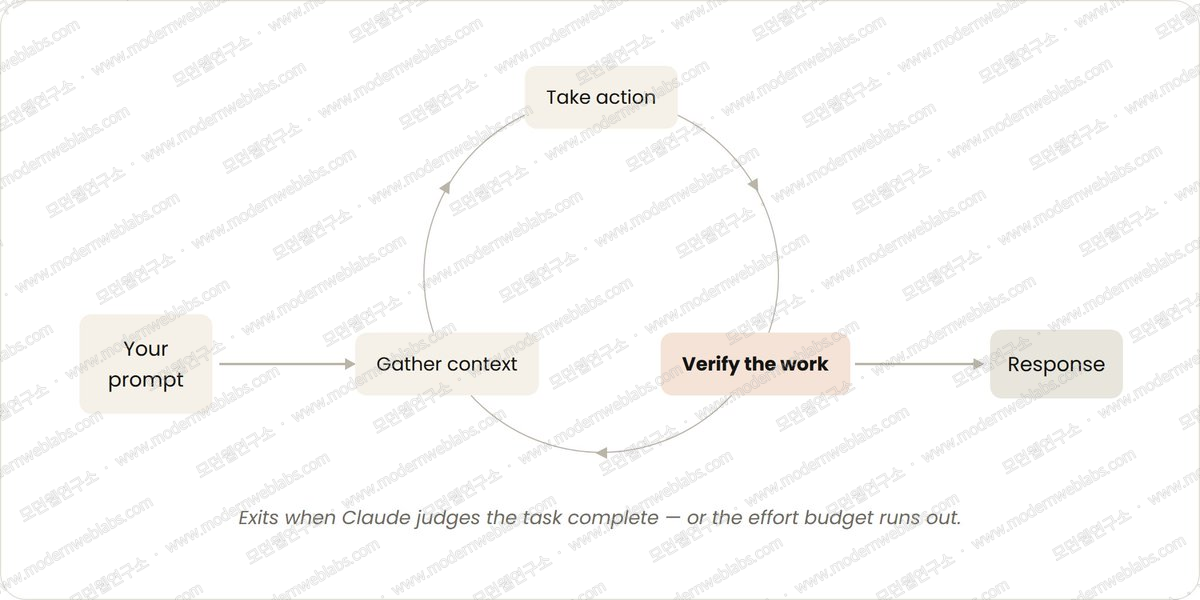
Triggered by: a user prompt
Stops when: Claude judges the task complete or decides it needs more context
Best for: shorter tasks that are not part of a recurring process or schedule
Manage usage by: writing specific prompts and strengthening verification with skills to reduce the number of turns
In fact, every prompt you type already starts a loop. It is a manual form where a human directs each turn, but it is a loop nonetheless. Claude gathers context, takes action, checks the result, repeats if needed, and responds. The Claude Code team calls this cycle the 'agentic loop'.
Take a request to build a like button. Claude reads the code, makes the edit, runs the tests, judges the work done, and hands back the result. Then a human checks the result directly and writes the next prompt.
If you document that human verification routine in a SKILL.md file, Claude can verify its own work end to end. The verification skill should include tools or connectors that let Claude see, measure, and interact with the result. The more quantitative the checks, the easier Claude's self-verification becomes.
A SKILL.md that verifies frontend changes can look like this.
---
name: verify-frontend-change
description: Verify any UI change end-to-end before declaring it done.
---

# Verifying frontend changes
Never report a UI change as complete based on a successful edit alone. Verify it the way a human reviewer would.

1. Start the dev server and open the edited page in the browser.

2. Interact with the change directly. For a clickable control (button, input, toggle): click it, confirm the expected state change, and screenshot before/after.

3. Check the browser console. Zero new errors or warnings.

4. Run a performance trace with the Chrome DevTools MCP and audit Core Web Vitals.

If any step fails, fix the issue and rerun from step 1. Do not hand back partially verified work.
Goal-based loops (/goal)
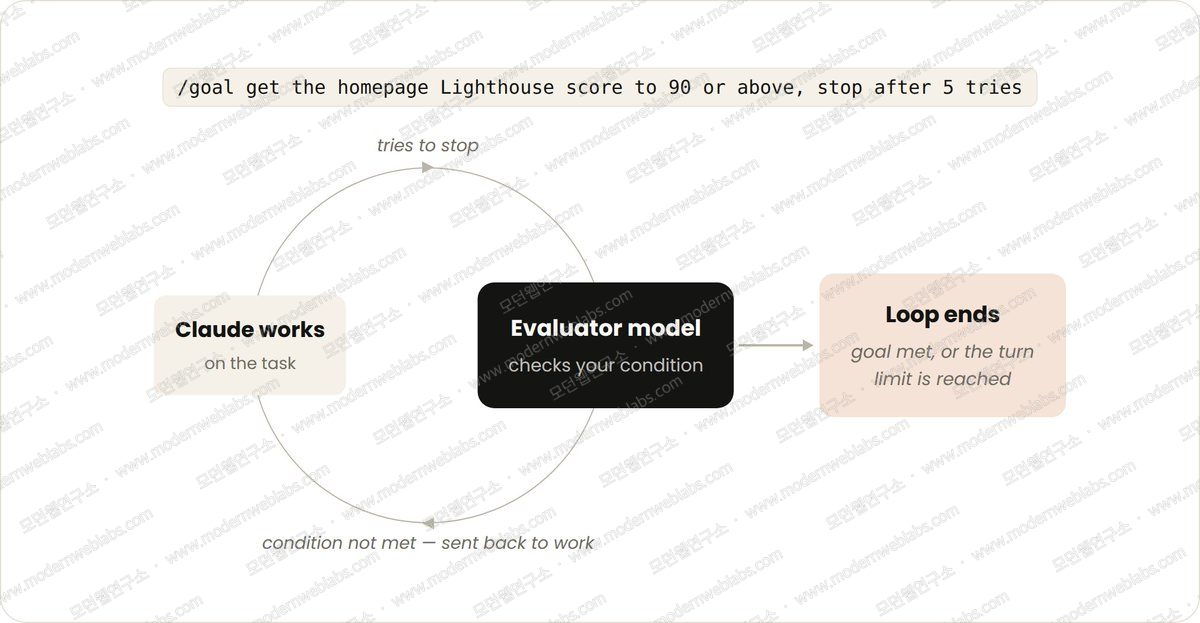
Triggered by: a prompt entered in real time with /goal in front
Stops when: the goal is achieved or a specified maximum number of turns is reached
Best for: tasks with verifiable exit criteria
Manage usage by: setting concrete completion criteria and explicit turn caps like 'stop after 5 tries'
The more complex the task, the less one turn is enough. Agents do better work when they can cycle repeatedly toward a goal. Define what the finished state looks like with /goal and Claude extends its iteration time to reach it.3
When a human defines the success criteria, Claude no longer has to judge 'is this good enough' on its own and end the loop early. Each time Claude tries to stop, an evaluator model checks the success condition. It sends Claude back to work until the goal is met or the specified turn count is reached.
This is why deterministic criteria work so well: the number of passing tests, or clearing a score threshold. The evaluator model has no room to hesitate.
/goal get the homepage Lighthouse score to 90 or above. Stop after 5 tries.
Time-based loops (/loop and /schedule)
Triggered by: a specified time interval elapsing
Stops when: a human cancels it or the work completes (the PR merges, the queue empties)
Best for: recurring work, or work that interacts with external environments and systems
Manage usage by: setting longer intervals, or reacting to events instead of time
Agents often handle recurring work where the task stays the same and only the inputs change. Summarizing Slack messages every morning is the classic example. That kind of work, plus work that depends on external systems, is what time-based loops handle. Check the external system at an interval and react to what changed. A PR waiting on code review or failing CI is the classic external system here.
/loop makes time-based loops easy. It re-runs a prompt at the interval you specify.4
/loop 5m check my PR, address review comments, and fix failing CI
/loop runs on your computer, so it stops when you turn it off. Create a routine with /schedule to move the loop to the cloud.
Newsletter
Notes vetted by enterprise practitioners, every two weeks.
Notes on Claude Code, GitHub Copilot, AI-native engineering strategy, and adoption case studies, curated every two weeks.
Proactive loops
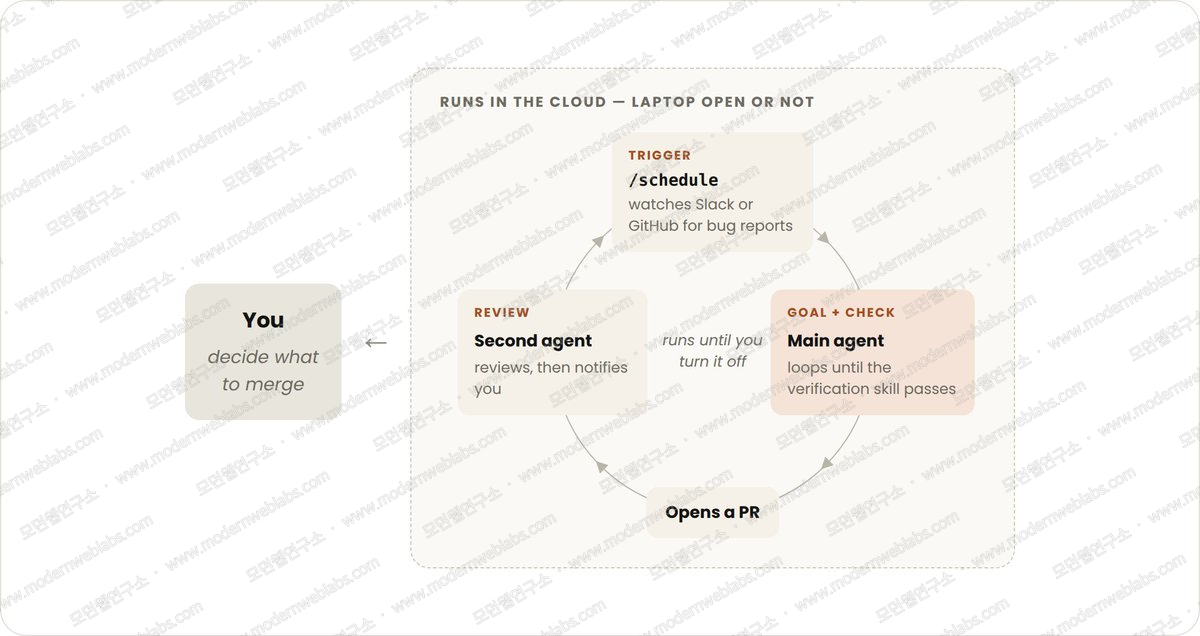
Triggered by: a specific event or schedule, with no human in real time
Stops when: each task exits on goal completion; the routine itself runs until a human turns it off
Best for: well-defined recurring work such as bug report handling, issue triage, migrations, and dependency upgrades
Manage usage by: running routines on smaller, faster models and using the most capable model only where judgment is needed
The primitives above can be composed with other Claude Code features like auto mode and dynamic workflows (research preview) into long-running loops.5 Take a loop that handles incoming feedback. The composition looks like this.
/schedule(research preview) runs a routine that checks for new reports/goaldefines what done looks like, and skills document how to verify itdynamic workflows orchestrate the agents that triage, fix, and review each report
auto mode keeps the routine running without stopping for permission
Put together, the prompt looks like this.
/schedule every hour: check the project-feedback channel for bug reports. /goal: don't stop until every report found this run is triaged, actioned, and responded to. When fixing a bug, use a dynamic workflow to explore three solutions in parallel worktrees, and have a separate judge agent review them adversarially.
Maintaining code quality
The quality of a loop's output depends on the system around it. Mind four things when designing that system.
Keep the codebase itself clean. Claude follows the patterns and conventions that already exist in it.
Give Claude a way to verify its own work. Document what 'good' looks like for you and your team as skills.
Make docs easy to reach. Framework and library docs carry the current best practices.
Use a second agent for code review. A reviewer starting with fresh context is less biased and unaffected by the main agent's reasoning. The built-in
/code-reviewskill, or Code Review products for GitHub such as Codex, both work.
When an individual result misses the bar, don't stop at fixing that one case. Feed the problem and its fix back into the system so every future iteration improves.
Managing token usage
To manage token usage, loops need clear boundaries.
Pick the right primitive and model for the job. Small tasks don't need multiple agents or loops. Some tasks are fine on cheaper, faster models.
Define success and stop criteria clearly. The more concretely you write what done looks like, the sooner (but not too soon) Claude arrives at the answer.
Pilot before a large run. Dynamic workflows can spawn hundreds of agents. Gauge usage on a small slice of the work first.
Use scripts for deterministic work. Running a script is cheaper than reasoning through the steps. Ship a form-filling script inside a PDF skill and Claude runs it each time instead of re-deriving the code.
Don't run routines more often than needed. Match the interval to how often the thing you're watching actually changes.
Review usage. The
/usagecommand breaks down recent token usage by skills, subagents, and MCPs./goalwith no arguments shows turns and token spend so far./workflowsshows each agent's token usage, and you can stop an agent at any time.
Where to start
The four loops in one table. The key is what piece of your own work each loop takes over.
Loop | You hand off | Use it when | Reach for |
|---|---|---|---|
Turn-based | The check | You're exploring or deciding | Custom verification skills |
Goal-based | The stop condition | You know what done looks like |
|
Time-based | The trigger | The work happens outside your project on a schedule |
|
Proactive | The prompt | The work is recurring and well-defined | All of the above, plus dynamic workflows |
To start with loops, look at the work you already do. Pick one task where you are the bottleneck and ask which piece you could hand off.
Can you write the verification method and criteria down?
Is the goal clear enough?
Does the work arrive on a schedule?
Once the bottleneck comes into focus, run the loop, observe where it stalls and where it over-reaches, and don't hesitate to iterate on it.
Wrapping up
What makes this guide useful is not the list of tools but the delegation lens. If prompt engineering was 'writing instructions well', loop design is deciding how much to hand to the agent: the check, the stop condition, the trigger, or the prompt itself. Modern Web Labs went through the same sequence while moving our biweekly newsletter drafts and content-publishing verification into loops. We built the verification skill first, defined the completion criteria, and only then promoted the work to a scheduled routine. Skip that order and build the proactive loop first, and you pay for it in both quality and cost.
To go deeper, read the Claude Code docs on running agents in parallel, goal, scheduled tasks, and dynamic workflows.
Peter Steinberger (@steipete), "You should be designing loops that prompt your agents.", X, 2026-06-08.
↩Claude Developers (@ClaudeDevs), Getting started with loops, X, 2026-07-07. Written by delba de Oliveira.
↩Anthropic, Keep Claude working toward a goal, Claude Code Docs.
↩Anthropic, Run prompts on a schedule, Claude Code Docs.
↩Anthropic, Orchestrate subagents at scale with dynamic workflows, Claude Code Docs.
↩
Originally published at Modern Web Labs (www.modernweblabs.com). © Modern Web Labs. All rights reserved.
Newsletter
Notes vetted by enterprise practitioners, every two weeks.
Notes on Claude Code, GitHub Copilot, AI-native engineering strategy, and adoption case studies, curated every two weeks.
Modern Web Labs · Consulting
You read it. Now bring it into your team.
If the patterns in this post fit your situation, start with a short conversation about how to apply them.
How we can help
Claude Code · GitHub Copilot
Two-day hands-on plus AI-graded in-house certification
AI-Native Strategy
Redesign operating standards, measurement, and governance
Web Platform
Building full-stack services on Next.js