How Claude Code's Engineers Design for the Cache: Cut Your Claude API Bill in Half
Before downgrading your model, two levers cut cost by half or more on the same model: prompt caching (90% off cache reads) and the Batch API (50% off). When and how to use each, with real numbers, plus the caching design principles the engineers who built Claude Code shared publicly.

“The API bill is climbing faster than I expected.” Any team that has shipped an LLM feature has hit that moment. In many cases, before reaching for a cheaper model tier, there are two levers that cut cost by half or more on the same model by using the pricing structure itself: prompt caching and the Batch API. This article covers when each one helps and how to apply it in code, with real numbers.
Where the cost actually leaks
A Claude API bill ultimately comes down to input tokens × rate + output tokens × rate. The rate is set by the model tier (Haiku < Sonnet < Opus < Fable). It does not go up just because the context window is 1M instead of 200K.
For reference, here are the official rates for the main models as of June 2026 (per million tokens, USD).
| Model | Context window | Input | Output |
|---|---|---|---|
| Haiku 4.5 | 200K | $1 | $5 |
| Sonnet 4.5 | 200K | $3 | $15 |
| Sonnet 4.6 | 1M | $3 | $15 |
| Opus 4.8 | 1M | $5 | $25 |
| Fable 5 | 1M | $10 | $50 |
The key point is that Sonnet 4.5 (200K) and Sonnet 4.6 (1M) cost the same per token. Supporting a 1M context window does not by itself raise the price.1 So as long as you stay on the same model, there are two ways to cut the bill.
- Stop recomputing repeated input → prompt caching
- Batch up work that does not need to be real time → Batch API
Lever 1: Prompt caching (reuse the repeated prefix)
A long system prompt, an uploaded document, a codebase, tool definitions: anything that goes into every request unchanged is wasteful to reprocess each time. Prompt caching stores that fixed prefix and pulls it from cache on the next request instead of recomputing it.
The pricing multipliers are the heart of it. With the base input rate as 1:
| Operation | Multiplier | Meaning |
|---|---|---|
| Cache read (hit) | 0.1× | 90% cheaper on reuse |
| 5-min cache write | 1.25× | only on first store |
| 1-hour cache write | 2× | for longer retention |
The first store costs a bit more (1.25×), but a single reuse within 5 minutes already pays it back. After that, you keep reading the same prefix at 90% off.2
How to: put cache_control at the end of the fixed prefix
Caching is not an on/off switch. It is a breakpoint that marks "everything up to here is fixed." Add cache_control to the end of the block you want cached. The one principle: fixed content first, changing input last.
TypeScript
import Anthropic from "@anthropic-ai/sdk";
const anthropic = new Anthropic();

const res = await anthropic.messages.create({
  model: "claude-opus-4-8",
  max_tokens: 1024,
  system: [
    { type: "text", text: "You are an internal codebase assistant." },
    {
      type: "text",
      text: longCodebaseContext,             // tens of thousands of fixed tokens
      cache_control: { type: "ephemeral" },  // cache up to here (breakpoint)
    },
  ],
  messages: [
    { role: "user", content: userQuestion }, // the changing part goes after the cache
  ],
});

console.log(res.usage);
// cache_creation_input_tokens: tokens written to cache on the first request (1.25x)
// cache_read_input_tokens:     tokens saved from cache on later requests (0.1x)
Python
import anthropic
client = anthropic.Anthropic()

res = client.messages.create(
    model="claude-opus-4-8",
    max_tokens=1024,
    system=[
        {"type": "text", "text": "You are an internal codebase assistant."},
        {
            "type": "text",
            "text": long_codebase_context,           # tens of thousands of fixed tokens
            "cache_control": {"type": "ephemeral"},  # cache up to here (breakpoint)
        },
    ],
    messages=[{"role": "user", "content": user_question}],
)

print(res.usage)
# usage.cache_creation_input_tokens / usage.cache_read_input_tokens
You can confirm it works straight from usage in the response. If cache_read_input_tokens is large from the second request on, you are getting hits. If only cache_creation keeps showing up, your prefix is changing every time (check whether a timestamp or user name slipped into the fixed section).
Worth knowing
- Tool definitions are cacheable too. Put
cache_controlon the last tool in thetoolsarray to cache the whole set. - Default lifetime is 5 minutes and refreshes on each reuse. For less frequent use, enable the 1-hour option with
cache_control: { type: "ephemeral", ttl: "1h" }. - There is a minimum cacheable length. Opus 4.8 and Sonnet 4.6/4.5 need 1,024 tokens, Fable 5 needs 512, Haiku 4.5 needs 4,096. Shorter prefixes are not cached (no error, just ignored).
- A single character difference breaks the hit. The prefix must be 100% identical.
When to use: Real-time services that repeatedly send the same system prompt or documents, like chatbots and coding assistants. The longer the conversation and the larger the context, the bigger the gain.
Lever 2: Batch API (non-urgent work at half price)
If the response does not need to be immediate, the Batch API is the answer. You submit many requests at once for asynchronous processing, and both input and output tokens are 50% off.
- Most batches finish within an hour, and you get results when every request completes or at 24 hours, whichever comes first (requests not done within 24 hours expire).
- A single batch holds up to 100,000 requests or 256 MB. Results stay downloadable for 29 days.3
- Each request can use a different model and parameters, and each is processed independently.
How to: submit → poll → match results by custom_id
A batch is three steps. (1) Submit the list of requests, (2) poll until it is done, then (3) read the results and match them back with custom_id.
TypeScript
// 1) Submit: identify each request with custom_id (^[a-zA-Z0-9_-]{1,64}$)
const batch = await anthropic.messages.batches.create({
  requests: docs.map((doc) => ({
    custom_id: doc.id,
    params: {
      model: "claude-opus-4-8",
      max_tokens: 1024,
      messages: [
        { role: "user", content: "Summarize this document in 3 lines:\n" + doc.text },
      ],
    },
  })),
});

// 2) Poll until processing ends (usually within an hour)
let status = batch;
while (status.processing_status !== "ended") {
  await new Promise((r) => setTimeout(r, 60_000)); // every 60s
  status = await anthropic.messages.batches.retrieve(batch.id);
}

// 3) Read results: match back by custom_id
for await (const result of await anthropic.messages.batches.results(batch.id)) {
  if (result.result.type === "succeeded") {
    save(result.custom_id, result.result.message.content);
  } else if (result.result.type === "errored") {
    console.error(result.custom_id, result.result.error);
  }
}
Python
import time

# 1) Submit: identify each request with custom_id (^[a-zA-Z0-9_-]{1,64}$)
batch = client.messages.batches.create(
    requests=[
        {
            "custom_id": doc["id"],
            "params": {
                "model": "claude-opus-4-8",
                "max_tokens": 1024,
                "messages": [
                    {"role": "user", "content": "Summarize this document in 3 lines:\n" + doc["text"]},
                ],
            },
        }
        for doc in docs
    ],
)

# 2) Poll until processing ends (usually within an hour)
while client.messages.batches.retrieve(batch.id).processing_status != "ended":
    time.sleep(60)  # every 60s

# 3) Read results: match back by custom_id
for result in client.messages.batches.results(batch.id):
    if result.result.type == "succeeded":
        save(result.custom_id, result.result.message.content)
    elif result.result.type == "errored":
        print(result.custom_id, result.result.error)
If polling is a hassle, split the result step into a separate worker. The key is to keep custom_id aligned with your own database record key, so tens of thousands of results coming back out of order still land in the right place.
When to use: Large-scale evals, content moderation, bulk document summarization, classification, and tagging, overnight batch analysis, anything that does not need an answer "right now."
Using both together
The two discounts stack. Run a large set of requests that share context (the same instructions, the same reference document) as a batch, and the 50% batch discount sits on top of the 90% cache-read savings. It is simple to apply: put the same fixed context in each batch request's params.system and add cache_control, but since batches often run past 5 minutes, set ttl: "1h".
TypeScript
requests: docs.map((doc) => ({
  custom_id: doc.id,
  params: {
    model: "claude-opus-4-8",
    max_tokens: 1024,
    system: [
      {
        type: "text",
        text: sharedRubric,                          // shared fixed criteria for every request
        cache_control: { type: "ephemeral", ttl: "1h" },
      },
    ],
    messages: [{ role: "user", content: doc.text }], // the per-request part
  },
})),
Python
requests=[
    {
        "custom_id": doc["id"],
        "params": {
            "model": "claude-opus-4-8",
            "max_tokens": 1024,
            "system": [
                {
                    "type": "text",
                    "text": shared_rubric,  # shared fixed criteria for every request
                    "cache_control": {"type": "ephemeral", "ttl": "1h"},
                },
            ],
            "messages": [{"role": "user", "content": doc["text"]}],
        },
    }
    for doc in docs
]
(Note: max_tokens: 0 cache pre-warming is not supported inside a batch. The first request naturally writes the cache, and the rest read it.)
Newsletter
Notes vetted by enterprise practitioners, every two weeks.
Notes on Claude Code, GitHub Copilot, AI-native engineering strategy, and adoption case studies, curated every two weeks.
If you are building the agent yourself: design so the cache survives
So far this has been about making a single call cheaper. But a service where one session runs for dozens of turns — a chatbot, a coding assistant — is a different problem. Caching only pays off when each turn reuses the same prefix, and the longer a session runs, the more chances there are to break that prefix. Break it once and the entire context after it gets reprocessed at full price. One team hit this problem at product scale: the engineers who built Claude Code published what they learned designing their whole harness around caching8. The essentials:
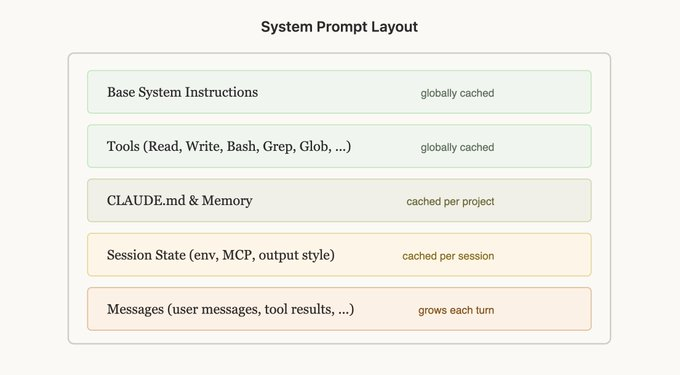
It all follows from one fact. Caching is a prefix match. A request is always assembled as tool definitions → system prompt → conversation messages, and a single changed byte anywhere in the prefix invalidates everything after it. So Claude Code layers content from least-changing to most-changing: static system prompt and tool definitions (shared globally) → project context (CLAUDE.md) → session context → conversation messages. Layered this way, even different sessions share the front layers in cache. The principle is the same one from earlier — static first, dynamic last — but over a long session it is surprisingly hard to hold.
Push updates through messages, not the prompt
Information goes stale mid-session all the time. The date rolls over, the user edits a file, a mode flips. The tempting move is to edit the system prompt, but that changes the prefix and throws away the whole cache. Claude Code does the opposite: it carries the changed information in the next turn's message at the end of the conversation, not in the fixed system prompt at the front. An update like "it is now Wednesday" gets tucked into the next user message or tool result as a <system-reminder> tag. The new message lands after the cached prefix, so the front layers stay intact.
const res = await anthropic.messages.create({
  model: "claude-opus-4-8",
  max_tokens: 1024,
  system: [
    { type: "text", text: STABLE_SYSTEM, cache_control: { type: "ephemeral" } },
  ],
  messages: [
    ...history,                                  // cached conversation (prefix intact)
    { role: "user", content: userMessage },
    // changed context goes here, not in the system prompt
    { role: "system", content: "It is now Wednesday." },
  ],
});
This mid-conversation system message is a beta (mid-conversation-system-2026-04-07) available on models like Opus 4.8; on models that don't support it you get the same effect with a <system-reminder> text block inside the user message.
Model state transitions as tools
Wanting to turn tools on and off has the same trap. Tool definitions sit at the very front of the prefix (position 0), so adding or removing one tool mid-session invalidates that session's entire cache. So Claude Code never changes the tool set. It models the state transition as a tool instead. Plan mode is the example. Rather than swapping in a read-only tool set when entering plan mode, EnterPlanMode and ExitPlanMode are tools the model calls to switch modes. The tool definitions never change, so the cache survives — and as a bonus, the model can enter plan mode on its own when it hits a hard problem.
When there are dozens of tools and loading them all on every request is expensive (think many MCP tools), Claude Code defers rather than removes. Lightweight stubs — just the names, in a stable order (defer_loading) — stay in place, and the model pulls the full schema via tool search only when it needs one. The prefix is always the same set of stubs, so it stays stable. This tool search is available through the Claude API as well.
Don't switch models mid-session either
Caches are per-model, which produces a counterintuitive situation. If you're 100K tokens into an Opus conversation and route one easy question to cheaper Haiku, you have to rebuild Haiku's cache from scratch — which costs more than just letting Opus answer. If you must switch models, don't swap mid-conversation; split the work to a subagent. Keep the main conversation on one model and hand the cheaper model its task as a handoff message processed separately. Claude Code's Explore subagents use Haiku exactly this way.
The mistakes that break caching are usually small ones: a timestamp baked into the static prompt, tool definitions whose order shifts each time, quietly changing a tool's parameters, adding or removing a tool mid-session. "Only give the model the tools it needs right now" sounds reasonable, but that's precisely one of the most common ways to break the cache.
Fork operations share the parent's prefix too
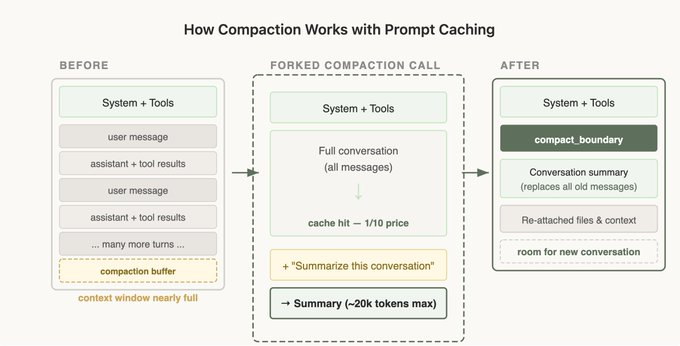
When a conversation is about to exceed the context window, you need compaction — summarizing the history so far and continuing fresh. Implement it naively and you break the cache again. If you fire a separate call with no system prompt and no tools just to summarize, it matches none of the main conversation's prefix, so all that input gets reprocessed at full price. Claude Code reuses the exact same system prompt, context, and tool definitions as the parent conversation, then appends only the compaction instruction as a new message. To the API it looks nearly identical to the parent's last request, so the prefix is reused. The same principle applies to any side call — summarization, subagents, skill execution: inherit the parent's prefix and put the only differences at the very end. Compaction is tricky enough that it's built into the Claude API as a feature, so unless you're building it yourself, just turn it on.
Finally, the Claude Code team monitors cache hit rate the way they monitor uptime. When it drops, they alert and treat it as an incident, because a few points of miss rate move cost and latency substantially. The takeaway: if you're building the agent yourself, caching isn't a toggle — it's a load-bearing assumption. Design the whole system so the prefix doesn't break, and most of the caching comes at no extra cost.
Do you really need to write code?
Everything so far assumes you are building a product directly on the Claude API. So what about someone who only uses a tool like Claude Code? The short version: builders use code, users get it automatically plus a few commands.
- Prompt caching is automatic in Claude Code. It marks static context (the system prompt,
CLAUDE.md, loaded files) as cacheable on its own and reuses the same prefix at 0.1× on the next turn. You never touchcache_control, and/costin the terminal shows your cache hit rate and spend.4 - The Batch API does not apply to an interactive CLI. It responds immediately, so there is no asynchronous-batch concept. Batching is for backend jobs that "gather tens of thousands of requests and run them at once."
- Instead, the levers you control by prompt and command are different. Context management (
/clear,/compact, rewind), model choice (/model), and trimming needlessly large output (long logs, grep dumps) are the main ones.
Even with automatic caching, a few habits help it land. Do not keep changing CLAUDE.md or your early instructions mid-session; changing the front invalidates everything cached behind it. And keeping one task in one session tends to improve your cache hit rate.
The effect, in numbers
Take a workload that sends a fixed 50K-token context (system + reference docs) on every request, on Opus 4.8 (input $5/MTok).
- No optimization: 50,000 × $5/MTok per request = $0.25
- With caching (repeat requests, hit): 50,000 × $0.50/MTok per request = $0.025 → about 90% off
- Batch + caching (large, non-real-time): add the 50% output discount on top and total cost drops once more
At 1,000 requests/day of real-time traffic, that is input cost alone going from $250 to $25. Without downgrading the model.
Cutting more at the team and enterprise level
Everything so far makes a single call cheaper. For a team of developers billed by API usage, there are organization-level levers on top of per-call optimization. Here are the patterns that come up again and again from Anthropic engineers and teams running this in production.
Make cost visible first
The console bill shows a total, not a breakdown by team, project, or developer.6 Pull token usage in real time with the Usage and Cost API5 to build a dashboard, or split workspaces by team and project and cap them with workspace spend limits. For finer attribution, put a gateway in front of your calls and tag tokens per request. If you cannot see where the money goes, every optimization is a guess.
The workspace is your cache boundary
Since February 2026, the prompt cache is isolated per workspace. If a team that shares the same system prompt or reference document is scattered across separate workspaces, they cannot share the cache and each one rewrites it. Services that share context do better grouped into one workspace to raise the cache hit rate.
Make model routing the team default
Sending every call to Opus is wasteful. Make a cascade the team standard: Haiku for classification, routing, and simple extraction, Sonnet for most production work, and Opus only for genuinely hard reasoning. Turn on extended thinking only where it is needed and cap the thinking token budget to match task difficulty.
Centralize non-real-time work into batches
If non-urgent work like evals, backfills, and overnight analysis is running as real-time calls scattered across the team, centralize it into a single batch pipeline to take the 50% discount in bulk.
Context hygiene and contracts
Trim the fat from your system prompts and prune conversation history instead of letting it grow without bound. In agent workflows, context editing (clearing old tool results) cuts input tokens directly. One team reports cutting per-session tokens by about 60% by combining caching, batching, and context pruning.7 Finally, if your monthly usage is large, do not price it at standard rates alone: check volume and committed-use discounts with enterprise sales.
Summary: the decision in one line
- Real-time service that repeats the same prompt → turn on prompt caching first and confirm hits via
usage. - Work that does not need an immediate answer at scale → run it through the Batch API and match by
custom_id. - Large, non-real-time work with shared context → stack both, with the cache at
ttl: "1h". - If you only use Claude Code → caching is automatic, so focus on managing context with
/clear,/compact, and/model.
Before you look at the bill and drop a model tier, check first whether these levers can halve the cost while keeping the same quality. For most LLM work, the fastest cost win comes not from swapping models but from using the pricing structure properly.
Sources
- Claude API Pricing, Context windows (per-model rates, context windows, standard long-context pricing) ↩
- Prompt caching (cache multipliers, minimums, per-workspace isolation) ↩
- Message Batches API (50% discount, turnaround, limits) ↩
- How Claude Code uses prompt caching (automatic caching in Claude Code) ↩
- Usage and Cost API (usage and cost monitoring) ↩
- Manage costs in Claude Code (workspace spend limits, etc.) ↩
- Claude API Cost Optimization (dev.to) (community report of ~60% per-session savings) ↩
- Lessons from Building Claude Code: Prompt Caching Is Everything (caching design principles shared by a Claude Code engineer) ↩
Originally published at Modern Web Labs (www.modernweblabs.com). © Modern Web Labs. All rights reserved.
Newsletter
Notes vetted by enterprise practitioners, every two weeks.
Notes on Claude Code, GitHub Copilot, AI-native engineering strategy, and adoption case studies, curated every two weeks.
Modern Web Labs · Consulting
You read it. Now bring it into your team.
If the patterns in this post fit your situation, start with a short conversation about how to apply them.
How we can help
Claude Code · GitHub Copilot
Two-day hands-on plus AI-graded in-house certification
AI-Native Strategy
Redesign operating standards, measurement, and governance
Web Platform
Building full-stack services on Next.js